

In March 2015, an overworked Samsung 840 Pro finally died after swallowing 2.4 petabytes of writes – roughly 2,400 times its own rating, and enough data to fill a few thousand laptops. That drive was tortured on purpose, but it answers the question people actually type into Google: how long do SSDs last?
Not in vague hand-waving. In numbers.
Most guides hand you “5–10 years” and call it a day. Which is about as useful as telling you a car lasts “some years.” The real answer depends on one thing you can measure: how much data you write per year. Get that number, find your drive’s TBW rating, and you can put an actual lifespan on your own SSD in about two minutes – with a calculator, or on paper.
In brief: a 1 TB drive rated at 600 TBW lasts 5 years only if you write about 120 TB a year (≈329 GB every single day). A normal desktop writing 4 TB a year would need roughly 150 years to wear it out. NAND wear is almost never what kills a home SSD – the controller, the firmware and plain obsolescence do.
The short answer: 5–10 years, or until the NAND is written out
Here’s the thing nobody puts in the first paragraph. The “5–10 years” figure is a real, calculable outcome – but only under one specific condition: you have to write 60–120 TB per year against a 600 TBW drive. That’s 165 to 330 GB of writes every day, forever.
Almost no home computer does that.
- A 600 TBW, 1 TB TLC drive at 120 TB/year → 5 years.
- The same drive at 60 TB/year → 10 years.
- The same drive at 4 TB/year (a typical desktop) → about 150 years.
So how long does an SSD last in practice? For home users, the honest answer is: longer than the computer it lives in. Ten years is the realistic floor, and the NAND is not the part that gives up first. What gives up is everything else – a controller fault, a firmware bug, a power event, or you simply wanting a faster drive.
First nuancе: the 5–10 year window still matters, just for different reasons. It’s roughly how long a consumer drive stays inside its warranty, how long firmware support lasts, and how long the platform around it (SATA, PCIe generation, your motherboard) stays current.
Secondly: the range exists because it describes time, not wear. A drive sitting in a powered-on but idle PC accumulates years without accumulating writes. Time passes; TBW doesn’t.
What actually decides an SSD’s lifespan: TBW, DWPD and NAND type
Three things set the ceiling. Learn them and every product page starts making sense.
TBW (terabytes written) is the rated total volume of host data a drive can absorb. Vendors pair it with a warranty period, and the warranty ends at whichever limit comes first. A Samsung 870 EVO 1 TB is rated 600 TBW or five years; the NVMe 990 PRO 1 TB carries the identical 600 TBW/five-year pairing (Samsung warranty terms).
DWPD (drive writes per day) normalizes TBW by capacity and warranty length. It’s how enterprise buyers compare a 960 GB drive with an 8 TB one:
DWPD = TBW ÷ (capacity in TB × 365 × warranty years)
A 960 GB Samsung PM893 rated 1,752 TBW over five years works out to 1,752 ÷ (0.96 × 365 × 5) = 1.0 DWPD. The same maths on a 1 TB consumer drive rated 600 TBW gives 0.33 DWPD.
NAND type sets the raw cell budget. Cells survive a limited number of program/erase cycles, and packing more bits per cell cuts that number:
- SLC (1 bit/cell): ~100,000 cycles
- MLC (2 bits): ~3,000–10,000 cycles
- TLC (3 bits): ~1,000–3,000 cycles
- QLC (4 bits): ~300–1,500 cycles
But here’s the second nuance: cell endurance is not drive endurance. Controllers hide the gap with SLC caching, wear leveling, over-provisioning and LDPC error correction. That’s why identical NAND ends up in drives rated 220 TBW and 1,752 TBW.
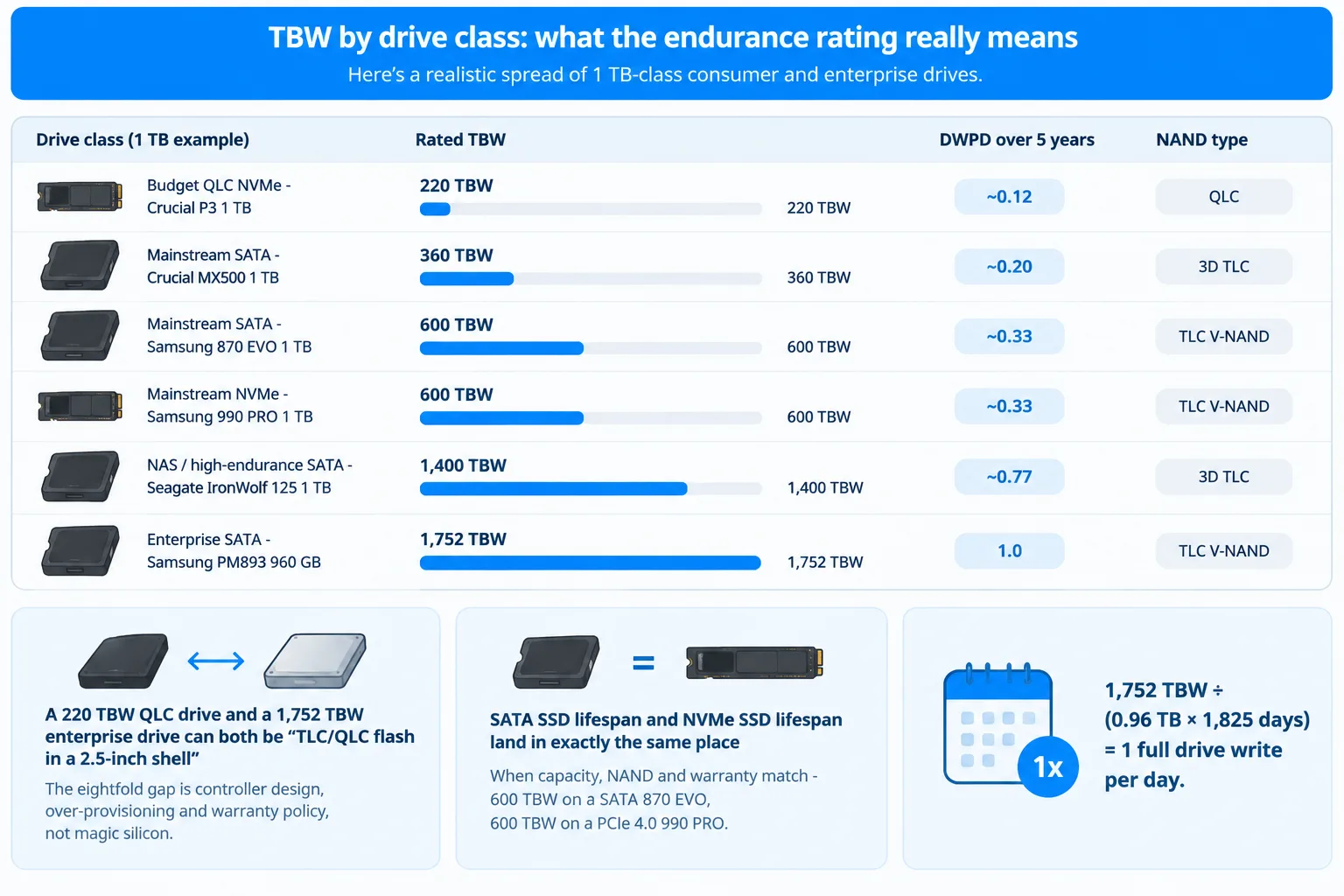
TBW by drive class: what the endurance rating really means
Endurance ratings are all over the place, and not because the NAND is that different. Here’s a realistic spread of 1 TB-class consumer and enterprise drives:
| Drive class (1 TB example) | Rated TBW | DWPD over 5 years | NAND type |
|---|---|---|---|
| Budget QLC NVMe – Crucial P3 1 TB | 220 TBW | ~0.12 | QLC |
| Mainstream SATA – Crucial MX500 1 TB | 360 TBW | ~0.20 | 3D TLC |
| Mainstream SATA – Samsung 870 EVO 1 TB | 600 TBW | ~0.33 | TLC V-NAND |
| Mainstream NVMe – Samsung 990 PRO 1 TB | 600 TBW | ~0.33 | TLC V-NAND |
| NAS / high-endurance SATA – Seagate IronWolf 125 1 TB | 1,400 TBW | ~0.77 | 3D TLC |
| Enterprise SATA – Samsung PM893 960 GB | 1,752 TBW | 1.0 | TLC V-NAND |
Read that table twice, because it settles a few arguments at once.
First: a 220 TBW QLC drive and a 1,752 TBW enterprise drive can both be “TLC/QLC flash in a 2.5-inch shell” – the eightfold gap is controller design, over-provisioning and warranty policy, not magic silicon.
Secondly: the interface is irrelevant. SATA SSD lifespan and NVMe SSD lifespan land in exactly the same place when capacity, NAND and warranty match – 600 TBW on a SATA 870 EVO, 600 TBW on a PCIe 4.0 990 PRO. A faster bus moves data quicker; it doesn’t wear cells faster.
Thirdly: you can run the ssd tbw calculator backwards. Want to know what a rating assumes? 1,752 TBW ÷ (0.96 TB × 1,825 days) = 1 full drive write per day. The warranty literally describes the workload it was priced for.
How many years is that in practice? The write-volume math
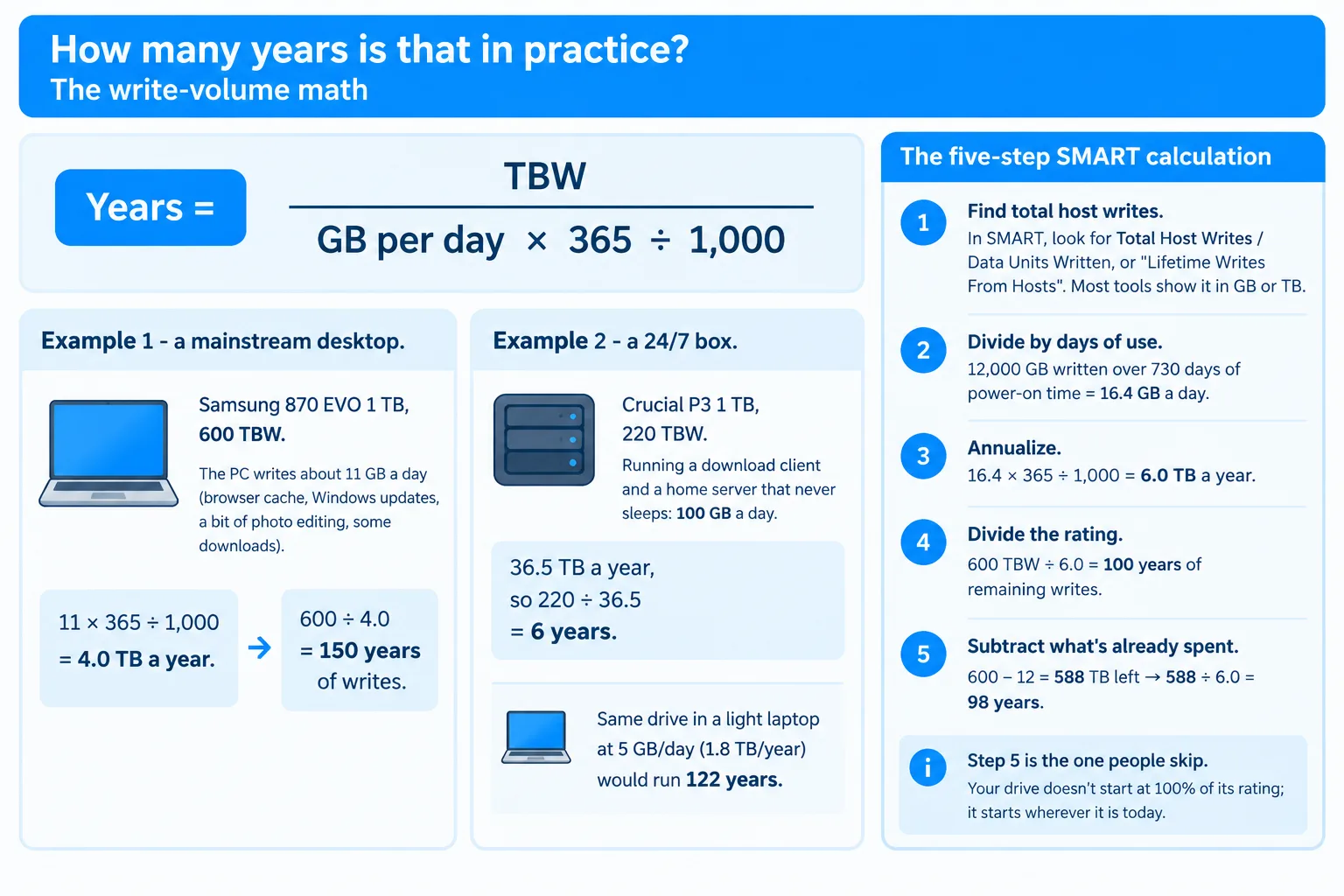
Time to convert terabytes into years. One formula does it:
Years of writes = rated TBW ÷ (GB written per day × 365 ÷ 1,000)
Example 1 – a mainstream desktop. Samsung 870 EVO 1 TB, 600 TBW. The PC writes about 11 GB a day (browser cache, Windows updates, a bit of photo editing, some downloads). That’s 11 × 365 ÷ 1,000 = 4.0 TB a year. Then 600 ÷ 4.0 = 150 years of writes.
Example 2 – a 24/7 box. Crucial P3 1 TB, 220 TBW, running a download client and a home server that never sleeps: 100 GB a day. That’s 36.5 TB a year, so 220 ÷ 36.5 = 6 years. Same drive in a light laptop at 5 GB/day (1.8 TB/year) would run 122 years.
And this is the entire “ssd lifespan calculator” intent – no app required:
- Find total host writes. In SMART, look for Total Host Writes / Data Units Written, or “Lifetime Writes From Hosts”. Most tools show it in GB or TB.
- Divide by days of use. 12,000 GB written over 730 days of power-on time = 16.4 GB a day.
- Annualize. 16.4 × 365 ÷ 1,000 = 6.0 TB a year.
- Divide the rating. 600 TBW ÷ 6.0 = 100 years of remaining writes.
- Subtract what’s already spent. 600 − 12 = 588 TB left → 588 ÷ 6.0 = 98 years.
Step 5 is the one people skip. Your drive doesn’t start at 100% of its rating; it starts wherever it is today. Which is why the honest answer to “how long will my SSD last” is always your number, not a range.
Lifespan by use case: office PC, laptop, gaming build, 24/7 writes
Daily write volume is the only variable that matters, and different machines write wildly different amounts. Here’s what the same two drives look like across scenarios:
| Use case | Writes per day | Per year | Years on 600 TBW | Years on 220 TBW |
|---|---|---|---|---|
| Office PC, browser + documents | 5 GB | 1.8 TB | ~330 | ~120 |
| Everyday laptop | 8 GB | 2.9 TB | ~205 | ~75 |
| Gaming build (installs, updates, shaders) | 15 GB | 5.5 TB | ~110 | ~40 |
| Photo/video editing | 40 GB | 14.6 TB | ~41 | ~15 |
| 24/7 writes (surveillance, seedbox, VM host) | 100 GB | 36.5 TB | ~16 | ~6 |
Now the comparison everyone asks about. SSD lifespan vs HDD is not really a contest of endurance – it’s a contest of failure modes. A hard drive dies from mechanical wear: heads, platters, bearings, shock. An SSD has none of that, but it has firmware, and firmware fails without warning. For sheer write volume in a desktop, the SSD wins on paper by a mile. For a drive that sits unplugged in a drawer for years, the spinning rust wins – NAND slowly leaks charge, magnetic media doesn’t care.
Caveat worth knowing: the “24/7 writes” row is where SSD buyers get burned. A cheap QLC drive logging camera footage around the clock is the one home scenario that genuinely approaches its rating.
How SSDs actually fail before the TBW runs out
NAND wear is the boring, slow death. The interesting failures are electrical and logical, and third-party endurance testing has mapped them out.
The best-known write-to-death experiment was Tech Report’s SSD Endurance Experiment, and its results were picked apart in an AnandTech forum follow-up thread from March 2015. Six consumer drives were hammered until they stopped responding. Every one of them exceeded its published endurance rating. The last survivor, the Samsung 840 Pro, passed 2.4 PB. The Intel 335 stopped around 700 TB – its media wear indicator ran out, the drive shifted to read-only, and then bricked itself on the next power cycle.
The takeaway those tests pushed into the community: retail SSD endurance is a warranty parameter, not a reliability prediction. Drives typically carry a reserve of 2–3× their rated TBW – and how gracefully they go at the end depends almost entirely on firmware quality. Big brands tend to lock into read-only so you can rescue data. Cheap no-name drives just vanish from the BIOS.
The Russian outlet 3DNews ran the same kind of test at far greater scale – over 50 consumer SSDs written to death, updated through December 2019. Their conclusion, translated from the Russian:
“Firstly, the endurance declared by manufacturers is a parameter that has nothing to do with real reliability. This characteristic concerns only the terms of warranty service, but in reality even the cheapest consumer SSDs are capable of surviving the rewriting of such a volume of data as exceeds the resource declared in the specifications many times over. Secondly, modern drives – at least when talking about recent and high-quality models from leading manufacturers – are no longer prone to sudden and inexplicable death.” – 3DNews, SSD endurance testing results
The numbers back the quote up, in both directions. An ADATA Ultimate SU700 rated for 140 TB survived 2,299 TB before failing. A Crucial MX300 rated 80 TB reached 2,659 TB. But a Kingston A400 rated 80 TB died at 613 TB with zero SMART warning, and an ADATA SU800 rated 200 TB failed at 176 TB – under its own rating. That’s the real lesson: 2–3× headroom is the pattern, not a guarantee, and the outliers are cheap drives with cheap controllers.
How to read the wear left on your own drive
Theory is nice; your drive’s SMART page is better. Three attributes carry the answer.
- Percentage Used (NVMe, attribute 0x05) – the controller’s own wear estimate, already expressed as a percentage of rated life.
- Media Wearout Indicator / SSD Life Left (SATA, 0xE7) – the same idea on older SATA drives, normalized to 100.
- Total Host Writes / Data Units Written – the raw odometer that feeds the calculation above.
Get the first two and you’re done in seconds; get the third and you can run the five-step maths yourself. A step-by-step walkthrough of each attribute lives in this SSD health check guide, and there’s a separate guide for NVMe SSD health checks where the attribute names differ and drive letters are rarer than GUIDs.
If you’d rather read one plain sentence than six hex tables, SSDLife’s JustNow™ feature turns the SMART dump into an immediate lifetime estimate – a one-time $19 PRO license for one PC, no subscription, and it never expires. You can download SSDLife here.
Signs your SSD is already failing
Wear gives you years of warning. Controllers don’t. Watch for these:
- Files that open but read back corrupted, or checksums that stop matching
- The drive switching itself to read-only mode
- Windows freezing for seconds at a time during writes, then recovering
- SMART flags: reallocated NAND blocks climbing, available spare dropping, “critical warning” set
- The drive disappearing from BIOS after a reboot – the classic no-name-drive exit
A full symptom list, with the SMART attributes behind each one, is on the SSD failure symptoms page. The short version: a drive that starts reallocating blocks in a steep curve is a drive to replace today, regardless of what the wear percentage says.
How to extend the life you have left
You can’t reset a NAND cell. You can stop wasting writes, though – and the honest advice is less dramatic than the old tweak lists.
- Keep 10–20% free. Free blocks are the controller’s working room; a nearly full drive rewrites the same cells over and over.
- Move bulk writes off the SSD. Torrents, scratch disks, video caches and surveillance footage belong on a hard drive.
- Leave TRIM alone. It’s on by default and it’s the single best thing between Windows and premature wear.
- Don’t disable the page file or hibernation out of paranoia. On a modern drive with a 600 TBW rating, that’s a rounding error.
- Keep the firmware updated. The failures in the endurance tests that weren’t wear-related were firmware-related.
- Watch temperatures. Hot NAND wears faster and, on a nearly full drive, throttles hard.
The practical playbook – including which Windows settings actually matter and which are myths – is in this guide to free ways to increase SSD life and speed.
FAQ: SSD lifespan questions people actually ask
How long does an SSD last?
For a normal home PC, 10+ years of writes – often far more. A 1 TB drive rated 600 TBW writing 4 TB a year lasts about 150 years on wear alone. Expect the machine to be replaced long before the NAND gives out; the realistic limiting factors are the controller, firmware and the age of the platform.
How long does a SSD last if not used?
Longer than the internet suggests, but not forever. JEDEC’s client-SSD requirement is one year of unpowered retention at 30 °C measured after the drive has already used up its entire endurance rating – and 3DNews verified that in practice, with six heavily worn drives losing no data over two weeks unpowered. A new drive left in a drawer will usually hold data for years. For SSD vs HDD for long-term storage, though, a hard drive or tape is still the safer archive: NAND slowly loses charge, magnetic media doesn’t. Power the drive up once or twice a year and it’s fine.
Is an SSD lifespan vs HDD comparison even fair?
Partly. SSDs fail from firmware and controller faults, HDDs fail from mechanics – heads, motors, shock. SSDs take far more write volume, but hard drives survive long unpowered storage better. For a working system drive, the SSD is the safer bet; for an archive on a shelf, the HDD is.
Do gaming and video editing shorten an SSD’s life?
Gaming barely does – a game writes tens of gigabytes once and then mostly reads. Video editing writes far more, and a 40 GB/day editing workflow still gives roughly 41 years on a 600 TBW drive. Install-heavy and 24/7 logging workloads are the ones that actually approach a rating.
Can you restore an SSD’s health to 100%?
No. Percentage Used only ever goes up; there’s no reset, and no firmware trick that un-wears a cell. What you can do is stop new writes from landing on the same blocks – free up space, move bulk writes elsewhere, and replace the drive when reallocated blocks start climbing.
Sources and methodology
Every number above traces back to a published source. Figures are as read on 18 November 2026.
- Tech Report SSD Endurance Experiment, via the AnandTech forum follow-up (forums.anandtech.com) – six consumer SSDs written until failure; measured 2.4 PB written on the surviving Samsung 840 Pro, ~700 TB on the Intel 335 before read-only, and the 2–3× headroom over rated TBW that the follow-up discussion concluded.
- 3DNews, “SSD reliability: endurance test results” (3dnews.ru, author Ilya Gavrichenkov, updated 16 December 2019) – continuous rewrites of 50+ consumer SSDs, including rated-vs-actual TBW figures per model and a two-week unpowered-retention test on worn drives.
- Samsung SSD warranty terms (semiconductor.samsung.com) – five-year/600 TBW pairing for the 870 EVO 1 TB and 990 PRO 1 TB.
- Samsung PM893 datasheet (samsung.com) – 960 GB rated 1,752 TBW, 1.0 DWPD over five years.
- Seagate IronWolf 125 datasheet (seagate.com) – 1 TB rated 1,400 TBW, 3D TLC, five-year or TBW warranty.
- Crucial product flyers (P3, MX500) – 1 TB ratings of 220 TBW (QLC) and 360 TBW (3D TLC).
- JEDEC SSD specifications, as summarized in JEDEC’s own briefing (jedec.org) – client retention requirement of one year at 30 °C after rated endurance is consumed.
- Writing volumes: Vadim Sterkin, “How long will your SSD live?” (outsidethebox.ms) – a measured real-world datapoint of ~7 GB/day host writes on a working desktop with a virtual machine and daily hibernation.
Methodology: TBW-to-years figures use Years = TBW ÷ (GB/day × 365 ÷ 1,000), rounded to the nearest whole year. DWPD uses TBW ÷ (capacity in TB × 365 × warranty years). Daily write volumes for the use-case table are stated scenarios, not measured population averages – the point is that the arithmetic is linear and two minutes long, so you can plug in your own GB/day.

 English
 Deutsch
 Français
 Español
 Italiano
 Português
 Português do Brasil